

ЗНАКОМЬТЕСЬ С ВЕБ-ВЕРСИЕЙ TCT
Веб-версия TCT повышает эффективность, позволяя создавать новые или редактировать существующие конфигурационные файлы и сохранять их непосредственно в FOTA WEB всего одним кликом


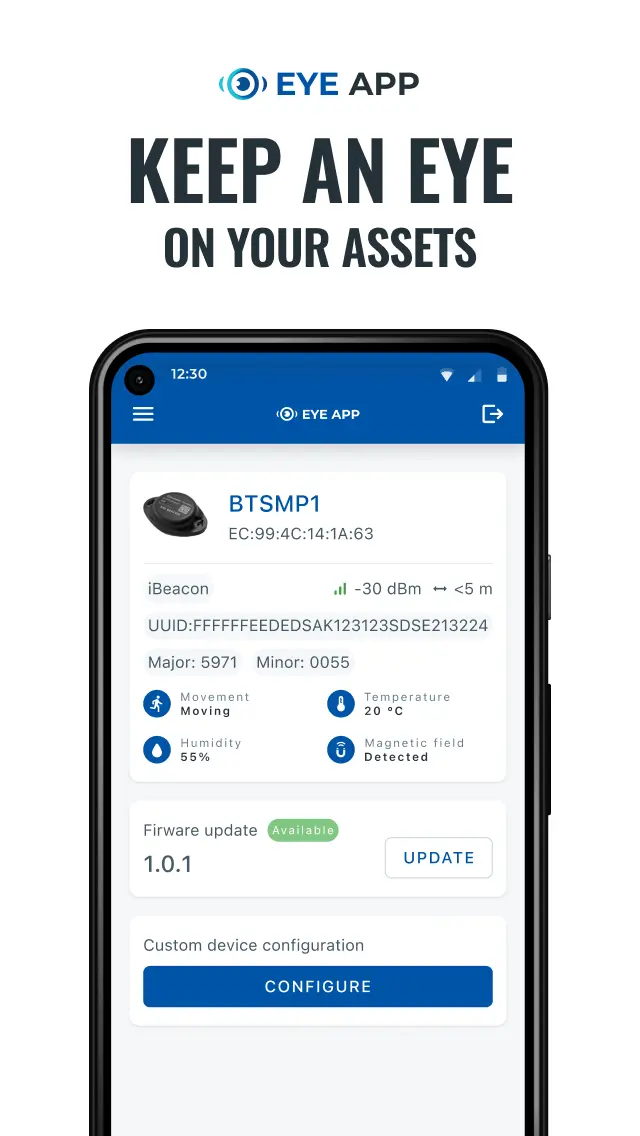
Scan and connect instantly
Discover nearby EYE devices via Bluetooth in seconds
Configure with ease
Adjust transmission intervals, power modes, and protocol settings
Monitor live data
View sensor readings such as temperature or movement in real time
Update firmware
Keep your devices up to date with the latest performance improvements
Secure access
Connect to devices with password protection for safe configuration
Historical data logging
(EYE EN12830)
store temperature readings and download them later as detailed compliance reports.
RELIABLE
Our professional employees and high-quality products make us your trusted business partner in telematics.
92% clients satisfied with partnership
25% employees working 5+ years
Devices continuously serving 10+ years

Innovative
We create opportunities by offering brand-new ways and solutions to apply telematics in your business.
Constantly growing R&D team
Project customisation for your needs
New products launched every year

EASY TO USE
Your hassle-free telematics experience all the way from your first inquiry to the implemented solution.
One configurator for all your needs
Effective remote device management
1,500 Wiki pages for easy reference

ПОЧЕМУ TELTONIKA
ПОПУЛЯРНЫЕ ФУНКЦИИ
Настраивайте и просматривайте беспроводные датчики и маяки, подключенные к вашему устройству, в едином удобном для пользователя пространстве.
Фильтруйте, сортируйте и ищите параметры устройства в соответствии с Вашими требованиями к конфигурации.
Получите полное представление о функциях, доступных для вашего устройства, и активируйте необходимые сценарии.


СОПУТСТВУЮЩИЕ ПРОДУКТЫ

Посмотреть больше
View less
ЧАСТО ЗАДАВАЕМЫЕ ВОПРОСЫ
– TCT предоставляется всем клиентам Teltonika без каких-либо дополнительных платежей.
– Веб-версия и десктоп версия TCT поддерживают только устройства Teltonika на платформе FT. Для получения более подробной информации обратитесь к технической документации.
- Error: empty slot
- Error: empty slot
- Error: empty slot
- Error: empty slot
- Error: empty slot


